Showing posts with label wireshark. Show all posts

Thursday, October 9, 2025

Some Hints on the use of Wireshark for IEC 61850-8-1 (MMS)

Please note the following preferences ... and have fun:

Version I used today:


Set the mms filter so see mms/IEC61850 only:


In case the MMS server is using a different port number: e.g., 12001 instead of standard port 102:

Analyze/Decode/ set other port number accordingly:


Check if presentation users context is correct:


Analyzing MMS/ASN.1/BER is sometimes tricky ... here is an example I figured out the other day ... if the length of a value is three (3) octets then the ASN.1 BER encoded message should indicate a length of 3 ... not 2 ... one single error in the length could damage the communication ...


Friday, February 23, 2024

Second Sketch (Video) on Some Basics: The Mapping of IEC 61850 to MMS

IEC 61850 is well accepted globally in the power utility domain. One key issue has always been discussed and criticized: The mapping of the information models (Logical Devices, Logical Nodes, Data Objects ... ) and information exchange services to MMS (Manufacturing Message Specification defined in the standards ISO 9506-1 and ISO 9506-2, developed in the 1980s).

This video (58 minutes) explains the concepts of the mapping to MMS ... ASN.1, ASN.1 BER ... MMS for GOOSE and Sampled Values !?

Click HERE to access the video.

I will continue to produce more sketches (videos) and make them available through Screencast.

I look forward to your feedback.

Enjoy.

Tuesday, November 28, 2023

Up-to-Date IEC 61850 Trial Tools Available From InfoTech (Poland)

Have you ever tried to send or receive messages according to IEC 61850 or IEC 61400-25: Operate, Report, Get, ... GOOSE, Sampled Values, ... try the following updated trial tools ... from InfoTech (Poland) 

Use of Sampled Value Publisher (Sender) according to IEC 61850-9-2LE:


Window for various parameter that can be modified and applied:

Wireshark trace of a SV message:


Access several presentations and the link for the trial versions:

Client/Server, GOOSE Sender & Receiver, SV Sender & Receiver

visualization on a flow diagram and on-line monitoring of GOOSE based on SCD file as input

Simulator of a network of server IEDs based on SCL files (ICD/CID/IID/SCD)  +  creator/editor of ICD

Overview of the Library which we license as source code or as derived binary DLLs for PC/MS Windows

This is the link to the trial version of all tools

Enjoy.

Friday, November 24, 2023

IEC 61850 (MMS) Messages Traced with Wireshark, Local Host, and Loopback

Have you tried to trace some IEC 61850 (MMS) messages with Wireshark? 

Usually you expect to run Client and Server on different machines to have communication going through an Ethernet Network! Yes! No!

You could easily run the two on one PC and trace the traffic using Wireshark and select the TCP loopback adapter as the interface for Wireshark to look at !!! It is simple.


The address for the server is:


The Client and Server using the IEDScout 5.2 from Omicron:


Trace:


Tuesday, April 28, 2015

OPC Server using an IEC 61850 Client

OPC (DA and UA) is used quite often for higher level communication between PLCs and SCADA servers. How could you tap IEC 61850 information for communication to an OPC Client?

First of all, you need an IEC 61850 Client that talks to IEC 61850 Servers or receives GOOSE messages. Second, you need an OPC Server that sits on top of the IEC 61850 Client.

Softing (Nuremberg/Munich, Germany) offers such an OPC (DA and UA) Server with an IEC 61850 build-in client. The client automatically detects all logical nodes and data objects and converts them automatically into OPC items:

 image

OPC Server (DA and UA, dataFEED OPC Suite) with the build-in IEC 61850 client as well an OPC demo client from Softing is available, contact: http://industrial.softing.com/en

A free of charge copy of the dataFEED OPC Suite and OPC Client is available for interested attendees of NettedAutomations training courses.

Click HERE to check a Video with a brief demo on how to use the dataFEED in conjunction with IEC 61850.

Thursday, September 11, 2014

Problem with Wireshark and MMS in the latest versions

You may run into the situation with one of the latest versions of Wireshark, that you cannot display the MMS messages. You may see these frames:

image

What is that? T.125?

If you see this, you have to remove the T.125 Protocol under Analyze:

image

Depending on the version of Wireshark you have, there may be also a need to configure MMS under Edit->Preference->Protocols->PRES:

image

Now you should see MMS again:

image

I am using Wireshark Version 1.12.0

The bug is reported under:
http://comments.gmane.org/gmane.network.wireshark.bugs/62519

Good luck!

Monday, July 21, 2014

New: Hands-On Training with Real Devices and Process Signals

19 years after IEC 61850 standardization started, 10 years after publication of the first set of IEC 61850 core documents, and 10 years after intensive training worldwide, we are now facing a new challenge: Can everybody do hands-on work with the new technology without spending a lot of money?

Yes, You can – if you work with NettedAutomation GmbH.

NettedAutomation GmbH is entering into a new phase of training: using real devices and solutions to work with in the public 3 days general training courses. The program of the 3 days courses is as follows:

  • 1 1/2 days Introduction and basics on IEC 61850 (and briefly on IEC 60870-5-104)
  • 1/2 day Hands-on training on designing ICD and CID documents
  • 1/2 day Configuring and using Server devices for monitoring and control using IEC 61850 and IEC 60870-5-104
  • 1/2 day Configuring and using Client devices for IEC 61850 and gateways to IEC 60870-5-104 and proxy server to IEC 61850

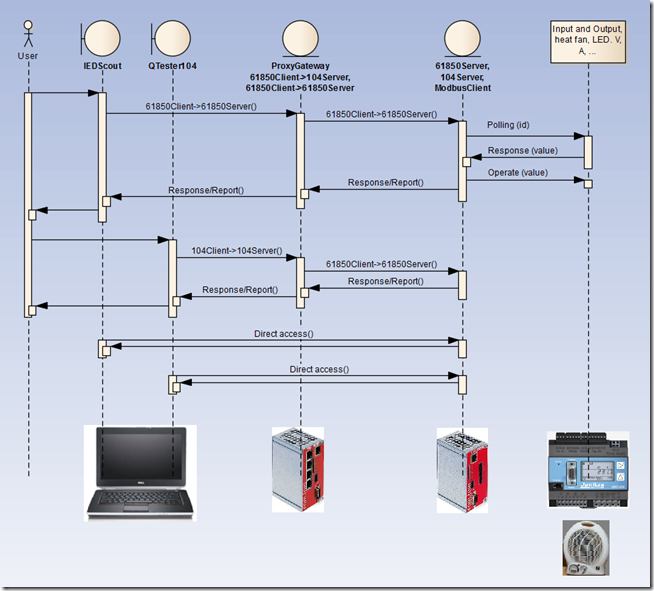
The first new training session according to this program will be conducted from October 15-17, 2014 in Frankfurt (Germany). The hands-on sessions using real devices, as depicted in the following figure, show the devices involved. Further evaluation software running under Windows (offered for free) will be provided at the beginning of the course.
image

On request we are preparing the above evaluation package with one com.tom 3.1S (104 Server, 61850 client and server), one com.tom 5.1 (104 Server, 61850 Server, Modbus client), a simple meter with Modbus RTU, 24 V power supply, relay to operate a fan, and a fan - mounted on DIN Rail. The com.tom (application, communication, and gateways) are configured via a web browser and a CID file – no programming or extra tools required.

Contact NettedAutomation GmbH to receive an offer for the above evaluation set, for the training in Frankfurt in October, or for an in-house training.

NettedAutomation will provide several evaluation sets for the hands-on training in October. For in-house hands-on training NettedAutomation can offer communication with these and other devices – even: bring your own devices.

By the way, beginning in fall 2014, NettedAutomation will also offer (with senior power and protection engineers) intensive 3 days Seminars on Protection and Control with IEC 61850 for HV/MV substations using GOOSE, SV, SCADA, … SCL:

  • IEC 61850 Introduction and experience. Where are we today?
  • Return of experience and application: with Protection and Control (mainly in medium and high voltage) Substation Automation and with SCADA systems.

All Presentations will be supported by practical examples

Contact NettedAutomation for further details on the special protection and SCADA training courses.

Please stay tuned.

Thursday, June 28, 2012

Updated IEC 61850 analyzer for WireShark (V2.6)

An updated analyzer for WireShark (V2.6) is available. It supports IEC 61850 (8-1, SCL import for GOOSE, 9-2, and 90-5), MMS and ICCP-TASE.2. Older versions show some problems that do not really exist. Some people are using the Wireshark as THE reference implementation of IEC 61850! The reference is the standard – but the tool is very helpful!

Download the exe file to install the new Wireshark version for IEC 61850.

The skunkworks version 2.6 analyzes all of the data. An additional utility that must be run to extract the dataset definitions into ETR files. The directory that the ETR files are located in can be set in the protocol preferences tab.

Thanks to Herb Falk for continuously updating the analyzer!

Sunday, October 9, 2011

Wireshark Analyzer to encode MMS, GOOSE, and SAV Messages

In July 2011 I reported about a problem analyzing MMS messages with Wireshark.

A comment to that post suggests the following successful solution … configure the analyzer as follows:

Set in PRES protocol preferences new user context item:

Context Id: 3
Syntax Name OID: 1.0.9506.2.1

Select Edit and Preferences at the bottom:

image

Select Protocols … and PRES:

image

Edit PRES and select New and enter the values from above::

image

Thanks for the recommendation!

Have a great week.

Thursday, July 7, 2011

Wireshark Analyzer and IEC 61850 Messages (MMS, GOOSE, SAV)

When you use Wireshark (I run Version 1.6.0) you may have had a problem to see GOOSE and MMS messages. There is a simple solution how to visualize the MMS and GOOSE messages:

You have to start the Wireshark first, start analyzing and THEN connect from a IEC 61850 client to a server to open a MMS association. Now you see the messages … strange but it works … as you can see:

image